

You don’t need a massive budget or a stack of expensive subscriptions to tighten up your SEO. Most small business sites aren’t held back by secret tactics. They’re held back by a few fixable issues, such as indexing gaps, slow-loading pages, messy titles, thin content, and broken internal links.
The good news is that a solid audit doesn’t require paid tools to get started. A handful of no-cost platforms can show you where Google is struggling with your site, where users are getting a clunky experience, and where quick updates can create measurable wins.
The real value isn’t just having the tools. It’s knowing what to look at, what to ignore, and what to fix first so you don’t waste your week chasing minor warnings.
This guide walks you through the best free SEO audit tools and shows you exactly how to use each one to spot and fix the issues that commonly hold service business websites back. If you want a second set of eyes on what you find, Content Author offers a free 30-minute SEO consultation at the end of this post.
Google Search Console: Your First Stop For SEO Health
If you only set up one tool, make it Google Search Console. It’s Google’s own view into how your site appears in search, which pages are indexed, and which problems are getting in the way. It also ties directly into page experience reporting, including Core Web Vitals.
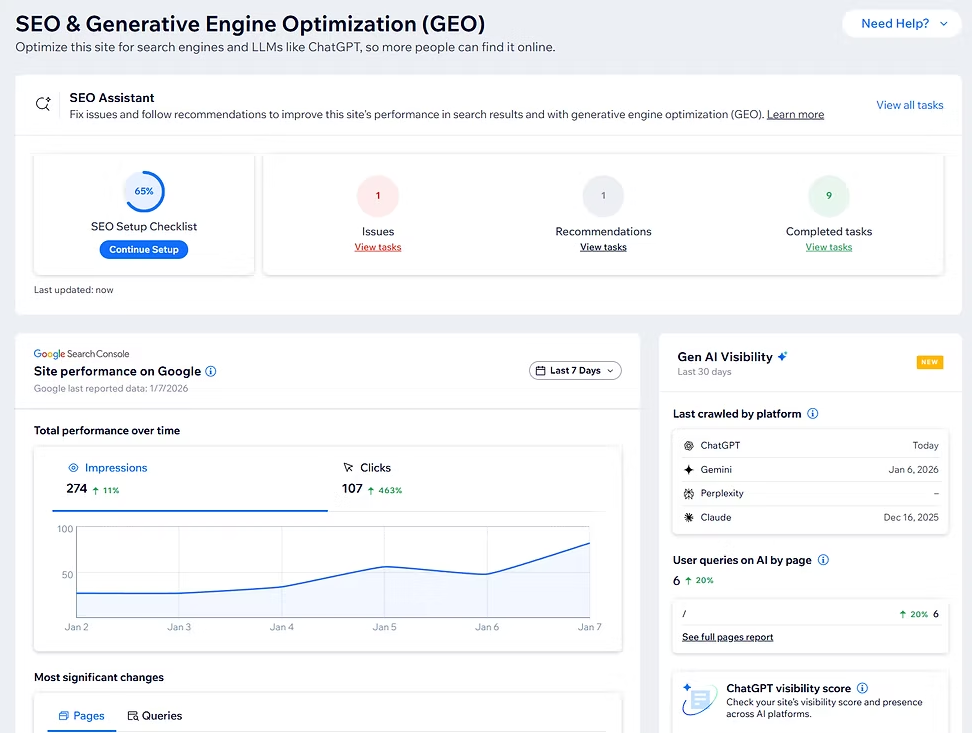
Start with three areas and keep it simple. “Pages” (indexing) tells you which URLs are indexed and which are blocked, redirected, or excluded. “Core Web Vitals” flags real user experience issues based on field data, not a one-off test. “Manual actions” and “Security issues” help you catch the scary stuff early.
Use this quick weekly routine:
- Check Performance for clicks, impressions, and queries that already show impressions but have low clicks.
- Review Pages to spot “Crawled currently not indexed,” “Duplicate,” and “Blocked” patterns.
- Open Core Web Vitals and look for groups of URLs failing on mobile first
- Validate fixes after changes so Google rechecks your updates.
In the Performance report, filter for queries with high impressions and an average position of 8-20. Those are often “near-wins” where better titles, stronger on-page content, or clearer internal links can move the needle without rewriting your whole site.
Make it a habit: check weekly, fix the obvious errors first, then validate. Consistency here beats a once-a-year deep audit every time.
Google PageSpeed Insights: Speed And UX Fixes Made Simple
PageSpeed Insights is great because it blends two perspectives: real user data (when available) and lab testing diagnostics that point to specific fixes. That combination helps you avoid guessing whether a change will matter.
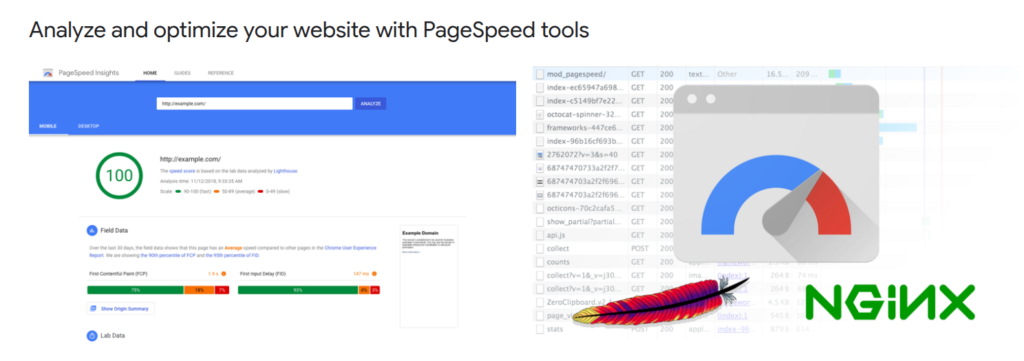
Run the test for your homepage and your top service page, and look at mobile first. The report provides separate mobile and desktop scores, and mobile is where problems usually show up. Focus on the metrics that align with Core Web Vitals: LCP (how quickly the main content appears), INP (how quickly the page responds to taps and clicks), and CLS (how much the layout jumps around). INP replaced FID, so if you still see older advice about FID, treat it as outdated.
A practical way to use the report is to treat it like a to-do list you can hand to a developer:
- Fix render-blocking scripts and styles that delay the first paint.
- Compress and properly size hero images that slow LCP.
- Reduce or delay third-party scripts (chat widgets, trackers) that hurt INP.
- Stabilize layout with fixed image dimensions and reserved space to cut CLS.
If you’re not working with a developer, you can still make progress with better image compression, fewer heavy plugins, and simpler page layouts. Speed improvements also tend to improve conversions, so this work pays off even outside SEO.
Screaming Frog (Free Version): Crawl Like Googlebot
Screaming Frog is a desktop crawler that behaves like a search engine spider. It scans your site the way a bot would, then lists issues in a way that’s perfect for a cleanup sprint. The free version limits each crawl to 500 URLs, which is enough for many small business sites.
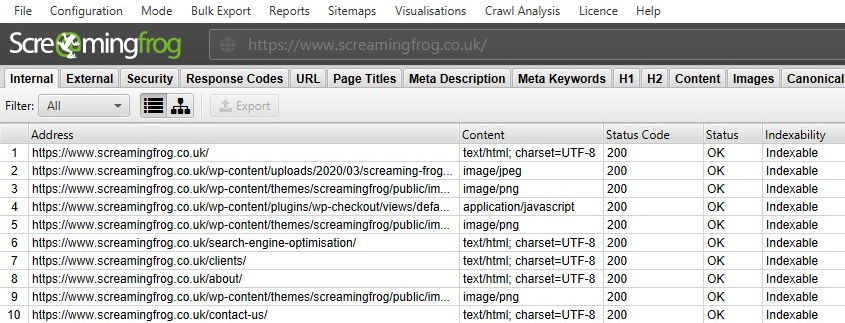
Run a basic audit with a simple flow: open the app, enter your domain, and start the crawl. Once it finishes, sort and filter so you’re not staring at a wall of data. Pay attention to issues that directly affect crawling and page clarity.
Start with these tabs and filters:
- Response Codes: Find 404s, 500s, and redirect chains.
- Page Titles: Spot missing titles, duplicates, or titles that are too long.
- Meta Description: Catch missing or duplicated descriptions.
- H1: Find missing or multiple H1s that confuse page structure.
- Internal: Check depth and orphan-like pages that get few internal links.
Prioritize urgent items first (broken links, redirect chains, 5xx errors). Then clean up duplicates and missing metadata, especially on your highest-traffic service pages. That order keeps you focused on fixes, Google, and users feel right away.
Ahrefs Free Tools: Quick Wins Without The Price Tag
Ahrefs offers a set of free tools that can still be useful for auditing, especially around links and visibility. Their free Webmaster Tools are aimed at site owners who want access to site audit and link insights without a full subscription.
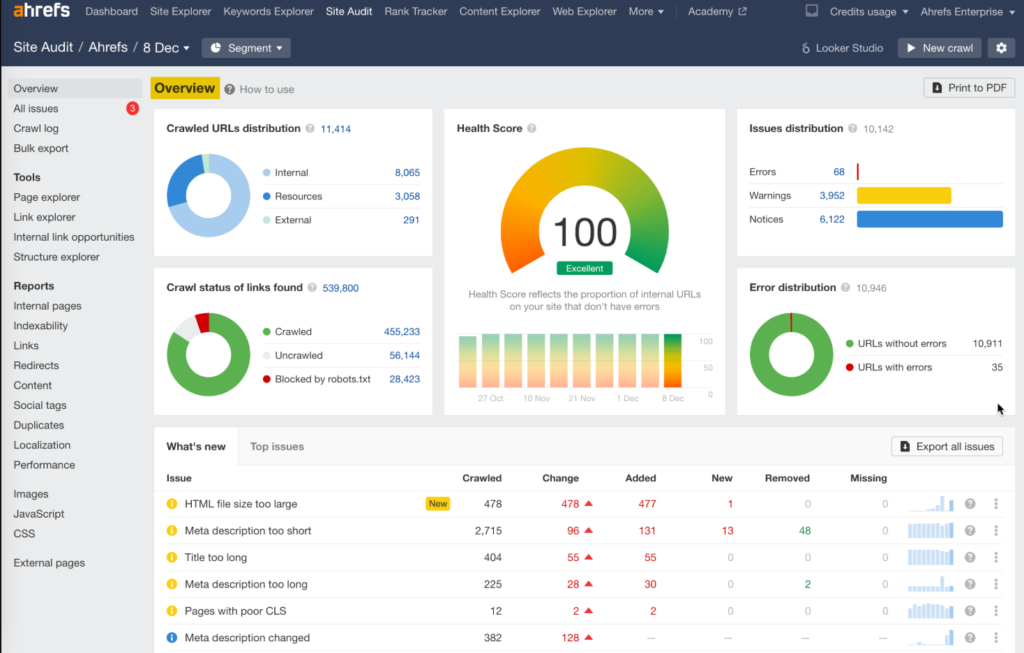
In Webmaster Tools, review backlinks and the pages they point to. A common problem is earning links to older URLs that now redirect, or to pages you’ve removed. That can create wasted link equity and a worse user experience if people land on thin pages.
Here’s a simple way to get value fast:
- Review top-linked pages and confirm they still exist and still match the intent.
- Look for lost backlinks and see if a page change caused the drop.
- Use a broken link checker to find dead outgoing links and fix them.
- Build a short list of “link-worthy” pages that deserve internal links from your nav or footer.
Their keyword tools can also help you brainstorm content topics around service intent. Pull a list of low-difficulty phrases, then pair them with a page you already have, like a service page, location page, or FAQ section. You’ll get more traction from improving what exists than chasing brand-new topics every week.
GTmetrix: Deeper Site Speed Diagnostics
GTmetrix is a strong companion to PageSpeed Insights because it highlights performance details in a format many developers like, especially the waterfall chart. The waterfall shows each request, how long it took, and what blocked the page from loading quickly.
Run a test and head straight to the waterfall. Look for a few patterns that often cause slowdowns: large image files, multiple script files loading early, and slow server response on the initial HTML request. That initial wait can make the whole site feel sluggish, even if images are optimized.
Quick wins you can often apply right away include compressing heavy images, removing unused plugins, and limiting third-party widgets on key pages. Bigger fixes might involve better caching, a faster hosting setup, or cleaning up theme code, and those are great items to hand to your developer with the GTmetrix report attached.
SEO Minion: Browser Extension For Instant Checks
SEO Minion is a Chrome extension that lets you run on-page checks directly in your browser. It’s ideal for quick spot-checks while you browse your own site, especially if you don’t want to log into multiple dashboards.
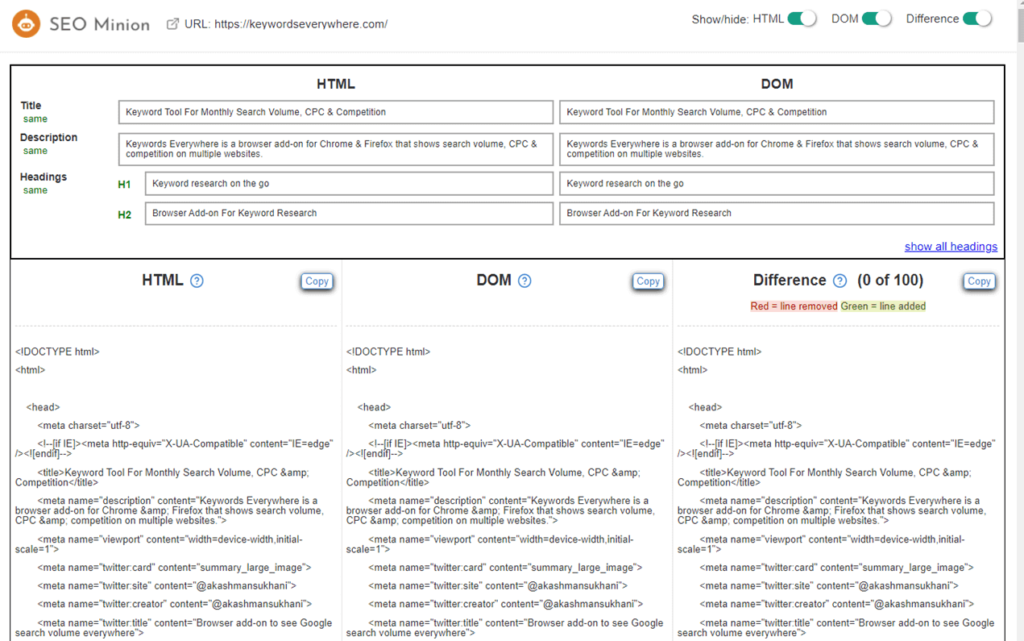
Use it on your homepage, your top service page, and a couple of blog posts. Confirm the basics are consistent and readable, since these details shape click-through rate and relevance signals.
A fast checklist inside the extension looks like this:
- Title tag length and clarity.
- Meta description uniqueness and relevance.
- H1 presence and whether it matches the page topic.
- Image alt text on key images (not every decorative icon).
- Internal links that help users reach service pages and contact pages.
The SERP preview feature is also useful for rewriting titles and descriptions with real-world spacing in mind. If you’re making edits page-by-page, SEO Minion keeps you moving without turning your audit into a research project.
SEMrush’s Free Site Audit Tool: Limited Use, Still Helpful
SEMrush’s Site Audit tool is a crawler that assigns a site health score and organizes issues by priority. The free tier is limited, but it’s still helpful for getting a second opinion on technical problems and on-page patterns. Free accounts are commonly capped at a small crawl allowance, so you’ll want to focus on your most important URLs first.
Run the audit on your main domain, then use the priority labels to guide your next steps. Pay close attention to crawlability issues, duplicate meta tags, and missed opportunities for structured data if you’re a local service business.
Make your free crawl count:
- Audit your homepage, top service pages, and your main contact page.
- Include your highest-traffic blog posts that bring in leads.
- Fix errors first, then re-run the audit on the same small set to confirm improvements.
If you’re consistently hitting limits, that’s usually the point where a paid tool or an agency workflow starts to make sense. Until then, the free tier can still surface plenty of actionable items.
Ubersuggest: Simple Keyword And Site Audit Support
Ubersuggest is a straightforward option for quick site audits and keyword checks, especially for business owners who want simpler reporting. The free account comes with specific limits, including a daily search limit and a weekly crawl cap for site audits.

Run a site audit and scan for “easy wins” first. Look for missing titles, thin pages, and broken internal links, then pair that with keyword ideas for pages that already convert. You’re not trying to build a huge keyword database here. You’re trying to pick a few phrases that match buyer intent and improve the pages that should rank for them.
A practical way to use Ubersuggest is to compare your domain with a couple of competitors. Look for gaps: services you offer that competitors have dedicated pages for, or FAQs they cover that you don’t. Then build a small content plan that fits your capacity, such as one improved service page per month and one supporting blog post.
How To Build A DIY SEO Audit Workflow Using These Tools
A DIY SEO audit works best with a repeatable order. Start with what Google already tells you, confirm user experience issues, crawl the site for technical cleanup, then layer in link and keyword insights. That keeps you from spending hours on reports that don’t match real search performance.
A simple workflow that stays efficient looks like this:
- Google Search Console: indexing issues, query opportunities, Core Web Vitals groups.
- PageSpeed Insights: key page speed problems and fix suggestions.
- Screaming Frog: broken links, redirects, missing titles, duplicates.
- Ahrefs tools: backlink checks, broken links, and content topic ideas.
- GTmetrix: waterfall clues when speed issues feel “mysterious.”
- SEO Minion: page-by-page spot checks while you edit.
- SEMrush or Ubersuggest: extra crawler validation and competitor gaps.
Track your fixes in a simple Google Sheet with columns like URL, issue, priority, fix date, and result. Set weekly Search Console check-ins and monthly crawl check-ins. That rhythm is what keeps your site healthy long after the first audit is done.
If you’d like, Content Author can walk through your Sheet and your Search Console data in a free 30-minute SEO consultation and help you pick the highest-impact next steps.
Frequently Asked Questions About Free Tools to Audit Your Website’s SEO (And How to Use Them)
What Is The Best Starting Point For A DIY SEO Audit?
Google Search Console is the best place to start because it shows how Google views your site right now, including indexing and performance trends. It also highlights groups of URLs with Core Web Vitals issues so you can fix patterns rather than chase individual pages. After that, run a crawl with Screaming Frog to uncover broken links, redirects, and missing metadata. This two-step combo usually reveals the most urgent issues fast.
How Often Should I Run An SEO Audit On A Small Business Website?
A monthly light audit works well for most service businesses, with weekly check-ins in Search Console. Monthly crawls help you catch broken links and duplicate metadata before they pile up. Weekly checks help you spot indexing errors, traffic drops, or page experience issues early. If you publish content often, add a quick on-page review each time you post.
Why Do Some Tools Show Different Speed Scores For The Same Page?
Different tools test in different environments, and some include real user data while others focus on lab testing. PageSpeed Insights blends CrUX field data (when available) with Lighthouse lab diagnostics, which can lead to mixed signals if your lab test looks good but real users have slower devices or networks. GTmetrix can also vary based on test location and settings, which change server response time and load order. Treat scores as clues, then use the diagnostics to decide what to fix.
What Should I Fix First If My Site Has Lots Of SEO Issues?
Fix issues that block crawling and indexing first, since they can prevent pages from appearing in search results at all. Next, address major speed and layout issues that degrade the user experience, especially on mobile. After that, clean up duplicated titles and missing metadata on your most important pages. Smaller “nice-to-have” items can wait until the core problems are stable.
Do I Need Screaming Frog If I Already Use Search Console?
Search Console is essential, but it won’t show you everything a crawler can see in one sweep. Screaming Frog finds internal issues such as broken links, redirect chains, missing H1s, and duplicate titles across your site. It’s also useful for validating large-scale fixes after you update templates or plugins. Using both tools gives you a clearer picture than relying on one dashboard.
How Can I Find High-Potential Keywords Without Paying For A Tool?
Start with the Search Console Performance report and look for queries with strong impressions but lower click and position counts on the second page. Those often respond well to better titles, stronger content sections, and clearer internal links. Then use free keyword generators to expand those ideas into related service-intent phrases, and pick a handful that match the pages you already have. This approach keeps your content plan grounded in what your site is already showing up for.
What Are Toxic Backlinks, and Should I Worry About Them?
“Toxic backlinks” usually refer to spammy or irrelevant links that look unnatural, and many sites accumulate them over time. Google’s systems often ignore low-quality spam links, so panic isn’t helpful. The real concern is a pattern of manipulative links that you or someone you hired actively built. If you see a sudden surge of suspicious links paired with ranking drops, that’s when it makes sense to investigate deeper and consider a cleanup plan.
Can These Free Tools Replace An Agency Audit?
They can get you very far, especially if your site is small and your goals are straightforward. Free tools can reveal indexing issues, speed problems, broken links, and content gaps, which are the foundation of most audits. An agency audit adds context, revenue-based prioritization, and a plan that fits your market and competitors. If you want that level of clarity without a long commitment, Content Author’s FREE 30-minute SEO Consultation is a good middle ground.
Final Thoughts: You Don’t Need Fancy, You Just Need Focus
The best tools won’t help if you don’t act on what they tell you. These no-cost options are more than enough to catch major problems, monitor performance, and keep your SEO on track. Regular audits, a clear priority list, and consistent follow-through beat a once-a-year “big review” every time.
Pick a simple routine, document your fixes, and stay focused on changes that improve crawling, speed, and page clarity. If you want help turning your audit findings into a practical plan, Content Author offers a free 30-minute SEO consultation. Bring your Search Console screenshots and your top questions, and we’ll map out the next steps together.
